
Table of Contents
Overview
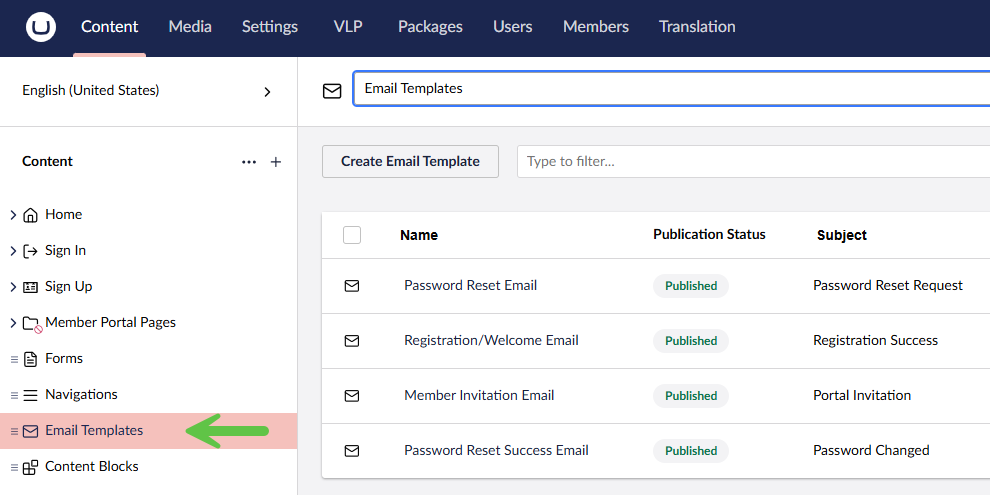
Email templates are configured under the Content section of the “Email Templates” node. The Body of the template is coded in MJML (Mailjet Markup Language – a common responsive email framework).
PRO TIP: There are various online tools to help you compose valid MJML. For example:

https://mjml.io/try-it-live

Documentation for MJML
Four email templates are included with the Vertical Lift Portal Starter Kit.
Click the “+” symbol to create a new Template or select an existing Template to edit.
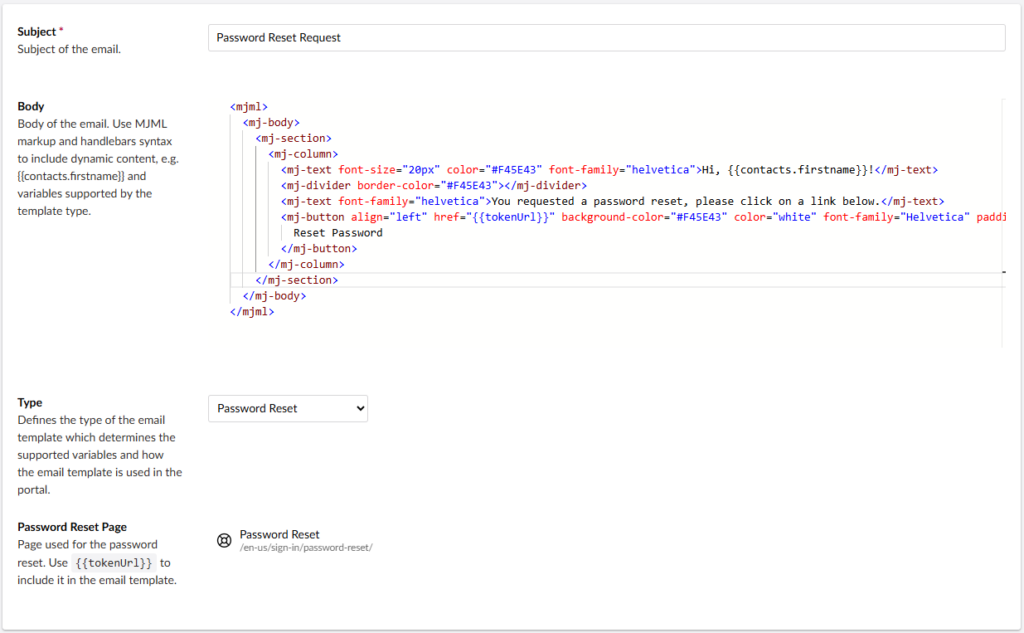
| Body | Body of the email in MJML markup. Use Handlebar syntax to include dynamic content, e.g. {{contacts.firstname}} and variables supported by the template type. |
| Type | Defines the type of the email template which determines the supported variables and how the email template is used in the portal. |
| Password Reset Page | Select the Page that is displayed with the user clicks the link in the password reset email. Only applicable when Type = Password Reset Use {{tokenURL}} for the URL reference. |
| Member Invitation Page | Select the Page that is displayed with the user clicks the link in the member invitation email. Applicable only when Type = Member Invitation Use {{tokenURL}} for the URL reference. |
Template Personalization
You can personalized the emails by adding dynamic content placeholders to the template.
- {{contact.firstname}} The first name of the Member receiving the email.
- ??
MJML Code Examples
Password Reset Email
<mjml>
  <mj-body>
    <mj-section>
      <mj-column>
        <mj-text font-size="20px" color="#F45E43" font-family="helvetica">Hi, {{contacts.firstname}}!</mj-text>
        <mj-divider border-color="#F45E43"></mj-divider>
        <mj-text font-family="helvetica">You requested a password reset, please click on a link below.</mj-text>
        <mj-button align="left" href="{{tokenUrl}}" background-color="#F45E43" color="white" font-family="Helvetica" padding="10px 25px">
          Reset Password
        </mj-button>
      </mj-column>
    </mj-section>
  </mj-body>
</mjml>
Registration / Welcome Email
<mjml>
  <mj-body>
    <mj-section>
      <mj-column>
        <mj-text font-size="20px" color="#F45E43" font-family="helvetica">Welcome, {{contacts.firstname}}!</mj-text>
        <mj-divider border-color="#F45E43"></mj-divider>
        <mj-text font-family="helvetica">This email is a confirmation of a successful registration in a VL Portal Demo website. </mj-text>
      </mj-column>
    </mj-section>
  </mj-body>
</mjml>
Member Invitation Email
<mjml>
  <mj-body>
    <mj-section>
      <mj-column>
        <mj-text font-size="20px" color="#F45E43" font-family="helvetica">Hi, {{contacts.firstname}}!</mj-text>
        <mj-divider border-color="#F45E43"></mj-divider>
        <mj-text font-family="helvetica">You are invited to join VL Portal! Please click on a button below.</mj-text>
        <mj-button align="left" href="{{tokenUrl}}" background-color="#F45E43" color="white" font-family="Helvetica" padding="10px 25px">
          Portal Invitation
        </mj-button>
      </mj-column>
    </mj-section>
  </mj-body>
</mjml>
Password Reset Success Email
<mjml>
  <mj-body>
    <mj-section>
      <mj-column>
        <mj-text font-size="20px" color="#F45E43" font-family="helvetica">Hi, {{contacts.firstname}}!</mj-text>
        <mj-divider border-color="#F45E43"></mj-divider>
        <mj-text font-family="helvetica">Your password has been changed!</mj-text>
      </mj-column>
    </mj-section>
  </mj-body>
</mjml>