The Data Grid Widget displays Dataverse data in a configurable, tabular format. Users can view and sort records, perform actions such as creating or deleting records, and export grid data to a CSV file.
Property
Description
Configuration
Defines the FetchXML query used to retrieve and populate the records displayed in the grid.
Relationship
Defines the relationship between the Data Grid and the Form when the grid is used within a form. This property is only configurable when the Data Grid is placed on a form.
Primary Record Link
Defines the page or URL to which the user is redirected when a primary record link in the grid is selected.
Toolbar
Property
Description
Hide Toolbar
Hides the Data Grid toolbar when enabled.
Buttons to Hide
Specifies which buttons are hidden from the Data Grid toolbar. Available options include New, Refresh, Export, and Delete.
New Button Destination
Defines the page or URL opened when the New button is selected. If no destination is specified, the Primary Record Link is used.
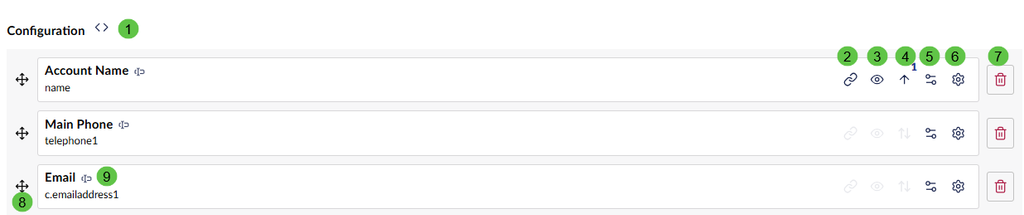
Configuring the Query
Function
Description
1
Opens the FetchXML editor used to configure the query that retrieves the Data Grid records.
2
Defines which column is used as the link to open the associated Dataverse record.
3
Toggles whether the column is visible in the Data Grid.
4
Defines the sort direction and sort priority applied to the FetchXML result set.
5
Configures column preferences, including hiding filtering and disabling sorting or column resizing.
6
Applies custom formatting to the values displayed in the column.
7
Removes the column from the Data Grid configuration and from the underlying FetchXML query.
8
Allows the column to be dragged and dropped to change its display order in the Data Grid.