
The Lookup widget represents Dataverse “Lookup” columns.
| Property | Description |
| Configuration | Defines the FetchXML query that populates the values in the lookup. |
| Default Value | Pre-populates the Lookup field with a default value. Empty Does not set a default value. First Item Sets the default to the first value of the query result. Current Contact Sets the default to the current portal user (this assumed that the portal user is logged in – otherwise the value is set to null). This option is only available when the table selected in the form configuration is “Contact”. |
Configuring the Query
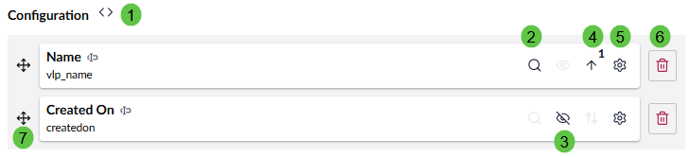
| Function | Description |
| 1 | Opens the FetchXML editor used to configure the query that retrieves the values for the lookup field.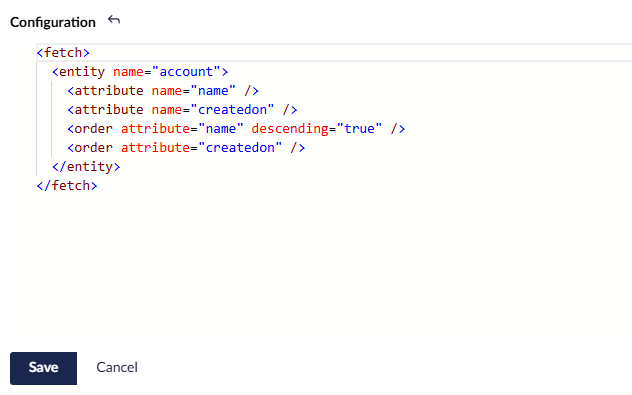 |
| 2 | Defines the primary search column used for type-ahead lookup searches. Only one column can be selected. |
| 3 | Controls whether the column is visible in the lookup results. At least one column must remain visible. |
| 4 | Defines the sort direction and sort priority applied to the FetchXML result set. |
| 5 | Opens the custom formatting options. Currently available only for Text and Date/Time columns. |
| 6 | Removes the column from the Lookup configuration and from the underlying FetchXML query. |
| 7 | Allows the column to be dragged and dropped to change its display order in the lookup results. |
Examples
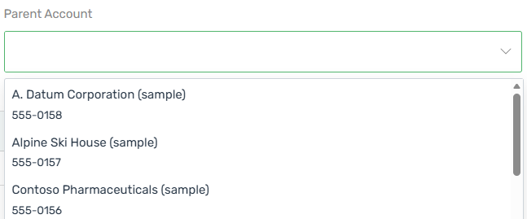
Sample Lookup field:
Sample FetchXML code:
<fetch>
  <entity name="account">
    <attribute name="name" />
    <attribute name="telephone1" />
    <filter>
      <condition attribute="statecode" operator="eq" value="0" />
    </filter>
    <order attribute="name" />
  </entity>
</fetch>